Cart v1
The basket
Embed the basket, set its options and styling, and override locales.
Embedding the Basket
The basket is used to display the cart.
To ensure interaction with the cart, a data-embed attribute is needed with the value of circuly-basket.
<div data-embed="circuly-basket">
  <script type="application/json">
    {
      "api_key": String
    }
  </script>
</div>
The <script> element must be a child of the basket, and have the type of application/json.
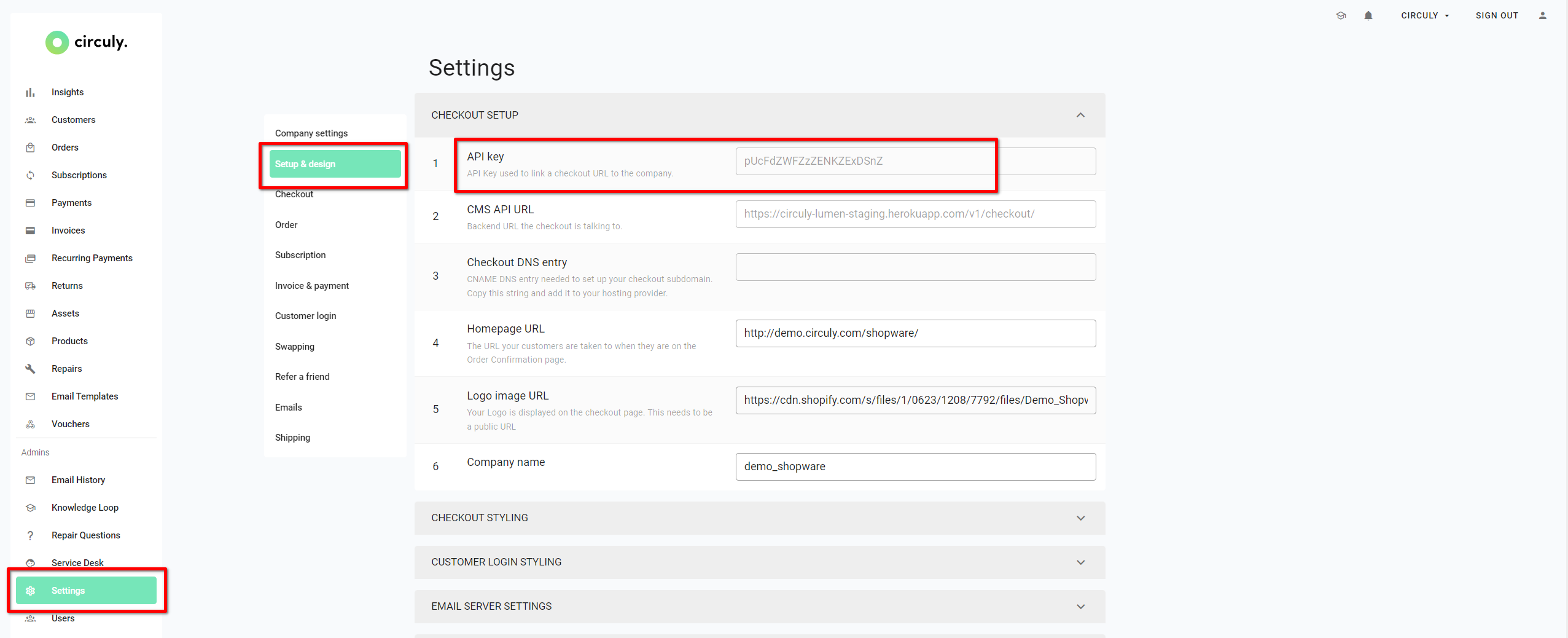
Please note that the API key is essential for proper functionality. You can locate it in the circuly operational backend by navigating to Settings > Setup & Design > Checkout Setup > API Key.
Options
Further options are available but not necessary. Either via attributes.
<div data-embed="circuly-basket" right detached tinted persistent></div>
Or as a part of the json object.
<div data-embed="circuly-basket">
  <script type="application/json">
    {
      "options": {
        "default_locale": String,          // default null
        "detached": Boolean,               // default false
        "persistent": Boolean              // default false
        "right": Boolean,                  // default false
        "tinted": Boolean,                 // default false

        "show_billing_frequency": Boolean  // default false
        "show_sum_purchases": Boolean      // default false
        "show_sum_subscriptions": Boolean  // default false
        "show_sum_total": Boolean          // default true
      }
    }
  </script>
</div>
Make sure the JSON object is valid.
See Cart options for more information.
Styling Options
A set of style overrides are also available.
<div data-embed="circuly-basket">
  <script type="application/json">
    {
      "style": {
          "border": "thin solid rgba(0, 0, 0, 0.2)",
          "border_radius": "4px",
          "box_shadow": "0 1px 1px 0 rgba(0, 0, 0, 0.05)",
          "button_cart_primary": "linear-gradient(240deg, #00E3AE -32.47%, #9BE15D 131.24%)",
          "button_cart_text_primary": "white",
          "button_checkout_primary": "linear-gradient(240deg, #00E3AE -32.47%, #9BE15D 131.24%)",
          "button_checkout_text_primary": "white",
          "button_primary": "white",
          "chip_primary": "orange",
          "font_family": "'Roboto', sans-serif",
          "font_weight": "light",
          "primary": "white",
          "product_card_primary": "white"
          "secondary": "#F0F0F0",
          "text_primary": "black",
          "text_secondary": "grey"
      }
    }
  </script>
</div>
See Styling options for more information.
Locales
Available since v1.8.
Override locales by setting new key-value pairs. Also, extending available locales by adding new locale objects.
<div data-embed="circuly-basket">
  <script type="application/json">
    {
      "locales": {
        "en": {
            // All key-value pairs are optional

            "checkout": "Checkout",
            "consumableProduct": "This item is a recurring delivery",
            "empty_cart": "Your cart is currently empty",
            "items": "Items | Item | Items",
            "outOfStock": "Out of stock",
            "purchases": "Purchases | Purchase | Purchases",
            "subscription_frequencies": {
                "daily": "Daily",
                "weekly": "Weekly",
                "monthly": "Monthly",
                "yearly": "Yearly"
            },
            "subscriptions": "Subscriptions | Subscription | Subscriptions",
            "total": "Total",
            "your_cart": "Your cart"
        }
      }
    }
  </script>
</div>
Natively supported locales:
de: German
dk: Danish
el: Greek
en: English
es: Spanish
fi: Finnish
fr: French
it: Italian
nl: Dutch
no: Norwegian
sl: Slovenian
sv: Swedish
zero | singular | plural for certain key values.